Scalar Quantities
Visualize scalar-valued data at the nodes or cells of a sparse volume grid.
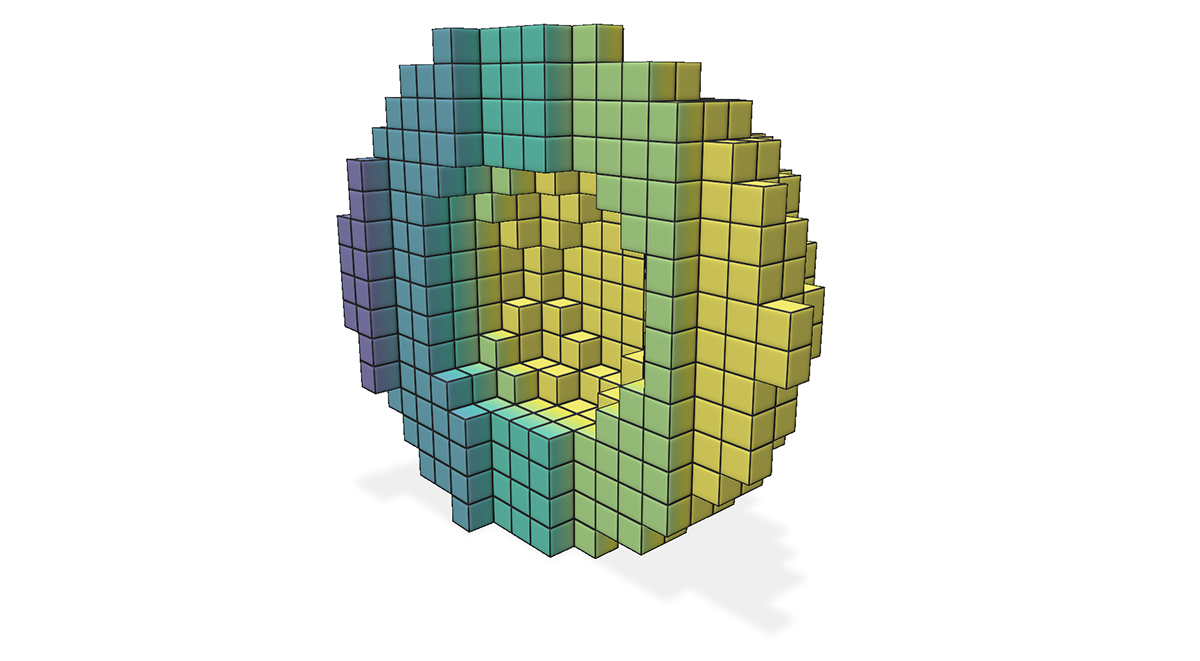
Example: adding scalar quantities to a sparse volume grid
#include "polyscope/polyscope.h"
#include "polyscope/sparse_volume_grid.h"

polyscope::init();

glm::vec3 origin{0., 0., 0.};
glm::vec3 cellWidth{0.1, 0.1, 0.1};

std::vector<glm::ivec3> occupiedCells = {
    {0, 0, 0}, {1, 0, 0}, {0, 1, 0}, {1, 1, 0},
};

polyscope::SparseVolumeGrid* psGrid = polyscope::registerSparseVolumeGrid(
        "sample sparse grid", origin, cellWidth, occupiedCells);

// === Cell scalar: one value per occupied cell ===
std::vector<float> cellScalars = {0.1f, 0.5f, 0.9f, 0.3f};
psGrid->addCellScalarQuantity("cell scalar", cellScalars);

// === Node scalar: values at node indices ===
// For each cell (i,j,k), its corner nodes are (i+dx, j+dy, k+dz) for dx,dy,dz in {0,1}.
// Collect all unique nodes and provide a value for each.
std::vector<glm::ivec3> nodeIndices = { /* all unique corner nodes */ };
std::vector<float> nodeValues = { /* one value per node index */ };
psGrid->addNodeScalarQuantity("node scalar", nodeIndices, nodeValues);

polyscope::show();
Add cell scalars
SparseVolumeGridCellScalarQuantity* SparseVolumeGrid::addCellScalarQuantity(std::string name, const T& values, DataType type = DataType::STANDARD)
Add a scalar quantity defined at the cells of the grid.
Add node scalars
SparseVolumeGridNodeScalarQuantity* SparseVolumeGrid::addNodeScalarQuantity(std::string name, const TI& nodeIndices, const TV& nodeValues, DataType type = DataType::STANDARD)
Add a scalar quantity defined at the nodes of the grid.
Node values are passed as paired arrays of node indices and values. For a cell with grid indices (i, j, k), its corner nodes have indices (i+dx, j+dy, k+dz) for dx, dy, dz in {0, 1}. The node indices may be passed in any order, and extra entries (for nodes not required by any occupied cell) are ignored. However, all required node values must be present.
namethe name of the quantitynodeIndicesan array ofglm::ivec3node grid indices. The type should be adaptable to an array ofglm::ivec3.nodeValuesa flat array of scalar values, one per entry innodeIndices. The type should be adaptable to afloatscalar array.typethe data type of the scalar (standard, symmetric, magnitude, etc.)
Categorical Scalars
Scalar quantities can also be used to visualize integer-valued labels such as categories, classes, segmentations, flags, etc.
Add the labels as a scalar quantity where the values just happen to be integers (each integer represents a particular class or label), and set DataType::CATEGORICAL. This will change the visualization to a different set of defaults, adjust some shading rules, and use a distinct color from the colormap for each label.
Color Bars
Each scalar quantity has an associated color map, which linearly maps scalar values to a spectrum of colors for visualization.
See colormaps for a listing of the available maps, and use quantity->setColorMap("cmap_name") to choose the map.
The colormap is always displayed with an inline colorbar in the structures panel, which also gives a histogram of the scalar values in your quantity.
The limits (vminmax) of the colormap range are given by the two numeric fields below the colored display. You can click and drag horizontally on these fields to adjust the map range, or ctrl-click (cmd-click) to enter arbitrary custom values.
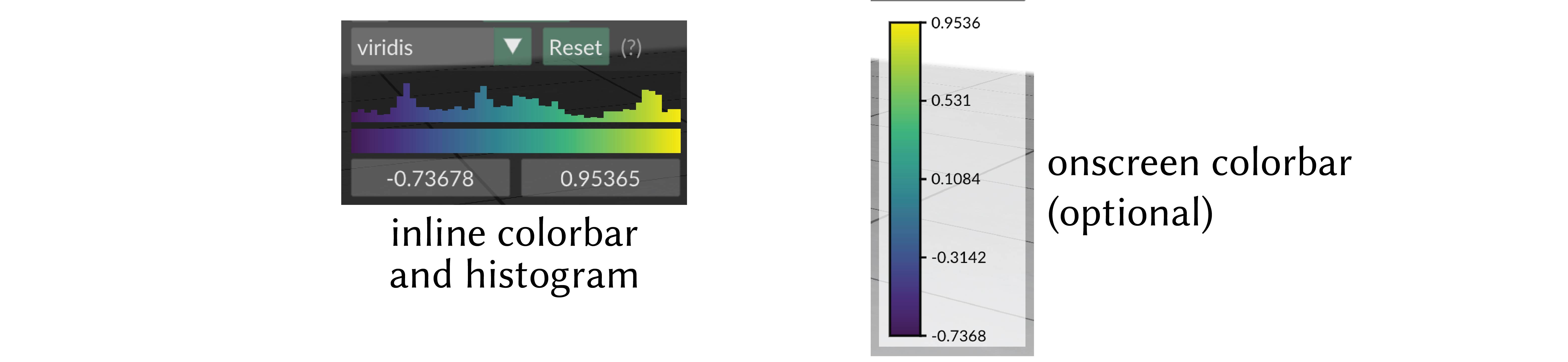
onscreen colorbar
Optionally an additional onscreen colorbar, which is more similar to the colorbars used in other plotting libraries, can be enabled with quantity->setOnscreenColorbarEnabled(true).
By default it is positioned automatically inline with the other UI elements, or it can be manually positioned with quantity->setOnscreenColorbarLocation(glm::vec2(xpos,ypos)).
You can even export this color map to an .svg file for creating figures, via the options menu, or with quantity->exportColorbarToSVG("filename.svg").
Scalar Quantity Options
These options and behaviors are available for all types of scalar quantities on any structure.
| Parameter | Meaning | Getter | Setter | Persistent? |
|---|---|---|---|---|
| enabled | is the quantity enabled? | bool isEnabled() |
setEnabled(bool newVal) |
yes |
| color map | the color map to use | std::string getColorMap() |
setColorMap(std::string newMap) |
yes |
| onscreen colorbar | additional onscreen colorbar | bool getOnscreenColorbarEnabled() |
setOnscreenColorbarEnabled(bool newVal) |
yes |
| onscreen colorbar location | where to put onscreen colorbar, (-1,-1) (default) means auto |
glm::vec2 getOnscreenColorbarLocation() |
setOnscreenColorbarLocation(glm::vec2 newVal) |
yes |
save colorbar to .svg file |
export colorbar to file | void exportColorbarToSVG(std::string filename) |
- | - |
| map range | the lower and upper limits used when mapping the data in to the color map | std::pair<double,double> getMapRange() |
setMapRange(std::pair<double,double>) and resetMapRange() |
no |
| isolines enabled | are isolines shaded (default=false) |
bool getIsolinesEnabled() |
setIsolinesEnabled(bool newVal) |
yes |
| isoline style | stripes or thin contour lines | IsolineStyle getIsolineStyle() |
setIsolineStyle(IsolineStyle newVal) |
yes |
| isoline period | period of isoline stripes, in data units | float getIsolinePeriod() |
setIsolinePeriod(float newVal) |
yes |
| isoline darkness | darkness of isoline stripes (default=0.7) |
float getIsolineDarkness() |
setIsolineDarkness(float newVal) |
yes |
| contour thickness | thickness of isoline contour lines (default=0.3) |
float getIsolineContourThickness() |
setIsolineContourThickness(float newVal) |
yes |