Volume Meshes
Visualize volumetric 3D meshes, with tetrahedral and hexahedral (cube-like) elements, or even more general prism or pyramidal elements. Meshes may be pure tet/hex/etc, or a mixture of different element types—we’ll use the term cell to refer generically to either a tet, hex, prism or pyramid element in a volume mesh.
As always, Polyscope can visualize the mesh itself, as well as any combination of scalar, color, or vector quantities associated with the vertices or cells of the mesh. Try clicking on the mesh to inspect the value of any quantity at that location, or using slice planes to inspect the internal structure and quantities defined within.
Registering a volume mesh
Example: registering a tetrahedral mesh from libIGL
#include "polyscope/polyscope.h"
#include "polyscope/volume_mesh.h"
#include <igl/readMESH.h>

// Initialize Polyscope
polyscope::init();

// Read mesh from file
Eigen::MatrixXd V; // vertex positions
Eigen::MatrixXi T; // tetrahedra
Eigen::MatrixXi F; // faces (we don't use these here)
igl::readMESH("path/to/volume.mesh", V, T, F);

// Register the volume mesh with Polyscope
polyscope::registerTetMesh("my mesh", V, T);

// Add a scalar quantity
size_t nVerts = V.rows();
std::vector<double> scalarV(nVerts);
for (size_t i = 0; i < nVerts; i++) {
  // use the x-coordinate of vertex position as a test function
  scalarV[i] = V(i,0);
}
polyscope::getVolumeMesh("my mesh")->addVertexScalarQuantity("scalar Q", scalarV);

// Show the GUI
polyscope::show();
Volume meshes are registered with Polyscope by passing the location of each vertex in the mesh, as well as the vertex indices for each cell. There are a few different variants to register meshes with pure tets and hexes, or a more general mixture of tets, hexes, prisms and pyramids. All of these register helpers return a pointer to a polyscope::VolumeMesh object which you can then add quantities to.
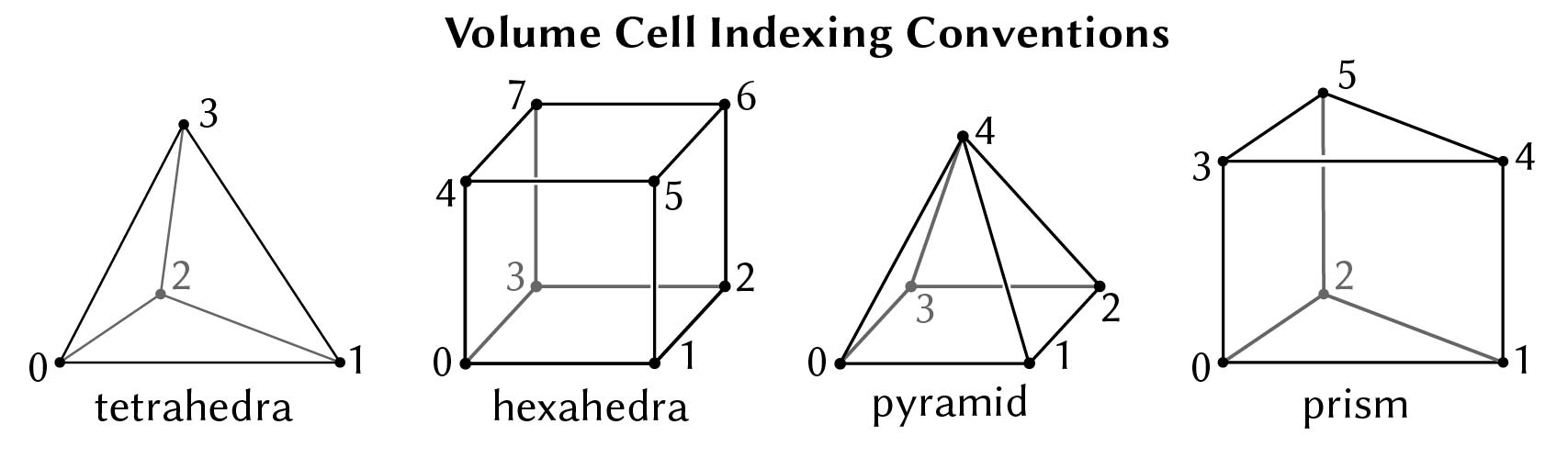
polyscope::registerTetMesh(std::string name, const V& vertexPositions, const C& tetIndices)
Add a new volume mesh structure to Polyscope, with all tetrahedral elements.
-
vertexPositionsis the vector array of 3D vertex locations. The type should be adaptable to an array offloat-valued 3-vectors; this allows many common types to be used as input, includingEigen::MatrixXdandstd::vector<std::array<double, 3>>. The length will be the number of vertices. -
tetIndicesis the 2D array of vertex indices for each tetrahedral cell, with dimension(C,4)whereCis the number of tets. The type should be adaptable to a nested array ofsize_t; this allows many common types to be used as input, includingEigen::MatrixXiandstd::vector<std::array<size_t, 4>>. All indices should be valid 0-based indices in to the vertex list.
polyscope::registerHexMesh(std::string name, const V& vertexPositions, const C& hexIndices)
Add a new volume mesh structure to Polyscope, with all hexahedral (cube-like) elements.
-
vertexPositionsis the vector array of 3D vertex locations. The type should be adaptable to an array offloat-valued 3-vectors; this allows many common types to be used as input, includingEigen::MatrixXdandstd::vector<std::array<double, 3>>. The length will be the number of vertices. -
hexIndicesis the 2D array of vertex indices for each hexahedral cell, with dimension(C,8)whereCis the number of hexes. The type should be adaptable to a nested array ofsize_t; this allows many common types to be used as input, includingEigen::MatrixXiandstd::vector<std::array<size_t, 8>>. All indices should be valid 0-based indices in to the vertex list.
polyscope::registerVolumeMesh(std::string name, const V& vertexPositions, const C& cellIndices)
Add a new volume mesh structure to Polyscope, with a general mix of cell types.
This variant takes a rectangular array as input, where all cell rows have 8 entries, but cells which are specified by less than 8 vertices are padded with -1.
For instance, a row of the 2D array cellIndices which refers to a tet cell might hold [12, 9, 22, 51, -1, -1, -1, -1]. A row in the 2D array cellIndices which refers to a prism cell might hold [18, 32, 51, 17, 85, 23, -1, -1], etc.
-
vertexPositionsis the vector array of 3D vertex locations. The type should be adaptable to an array offloat-valued 3-vectors; this allows many common types to be used as input, includingEigen::MatrixXdandstd::vector<std::array<double, 3>>. The length will be the number of vertices. -
cellIndicesis the 2D array of vertex indices for each cell, with dimension(C,8)whereCis the number of cells. For tet, prism and pyramid elements, the rows of the array should be right-padded with-1as appropriate for the cell topology. The type should be adaptable to a nested array ofunsigned int; this allows many common types to be used as input, includingEigen::MatrixXiandstd::vector<std::array<int, 8>>. All indices should be valid 0-based indices in to the vertex list, except padding entries which must be-1. Signed types should be used to support the-1padding convention. (NOTE: internally cell indices useUINT32_MAXfor invalid entries, but you should pass padding as-1via a signed type to the input adaptor.)
polyscope::registerTetHexMesh(std::string name, const V& vertexPositions, const Ct& tetIndices, const Ct& hexIndices)
Add a new volume mesh structure to Polyscope. This variant takes a mix of tet and hex elements, where each are given in their own separate list. Note that prisms and pyramids are also supported by the class, but not this constructor; use the general variant.
-
vertexPositionsis the vector array of 3D vertex locations. The type should be adaptable to an array offloat-valued 3-vectors; this allows many common types to be used as input, includingEigen::MatrixXdandstd::vector<std::array<double, 3>>. The length will be the number of vertices. -
tetIndicesis the 2D array of vertex indices for each tetrahedral cell, with dimension(C,4)whereCis the number of tets. The type should be adaptable to a nested array ofsize_t; this allows many common types to be used as input, includingEigen::MatrixXiandstd::vector<std::array<size_t, 4>>. All indices should be valid 0-based indices in to the vertex list. -
hexIndicesis the 2D array of vertex indices for each hexahedral cell, with dimension(C,8)whereCis the number of hexes. The type should be adaptable to a nested array ofsize_t; this allows many common types to be used as input, includingEigen::MatrixXiandstd::vector<std::array<size_t, 8>>. All indices should be valid 0-based indices in to the vertex list.
For the purposes of element ordering, the cells are presumed to be ordered with all tetrahedral cells coming first, then hexahedral cells.
No support for 2D
Unlike other structures, 2D volume meshes are not supported; they don’t make much sense (see 2D data).
Updating a mesh
The locations of the vertices in a mesh can be updated with the member function updateVertexPositions(newPositions). All quantities will be preserved. Changing the connectivity or element counts in a mesh is not supported, you will need to register a new mesh (perhaps with the same name to overwrite).
void VolumeMesh::updateVertexPositions(const V& newPositions)
Update the vertex positions in a volume mesh structure.
newPositionsis the vector array of 3D vertex locations. The type should be adaptable to an array offloat-valued 3-vectors. The length must be equal to the current number of vertices.
Slice planes
Slice planes are particularly useful for inspecting the internal structure of a volume mesh, as shown in the demo video at the top. Slice planes can be manipulated programmatically or manually in the GUI; see the slice plane documentation for more details.
Slice planes have special functionality for volume mesh vertex values—they can inspect quantities on volume meshes and render them on the interior of the volume. See the slice plane documentation for details.
Selection / Picking
“Picking” refers to selecting and inspecting elements by clicking on the object in the scene. As with other structures, you can call interpretPickResult() to get additional info about a click. See the overview of Selection / Picking for general information.
struct VolumeMeshPickResult {
  VolumeMeshElement elementType; // which kind of element did we click (enum values: {VERTEX, EDGE, FACE, CELL})
  int64_t index;                 // index of the clicked element
};
VolumeMeshPickResult VolumeMesh::interpretPickResult(PickResult result)
Get additional information about a click.
Options
See structure management for options common to all structures such as enabling/disabling, transforms, and transparency.
| Parameter | Meaning | Getter | Setter | Persistent? |
|---|---|---|---|---|
| color | the color of the outside of the volume | glm::vec3 getColor() |
setColor(glm::vec3 val) |
yes |
| interior color | the color of the inside of the volume | glm::vec3 getInteriorColor() |
setInteriorColor(glm::vec3 val) |
yes |
| edge color | the color of the edges of the mesh | glm::vec3 getEdgeColor() |
setEdgeColor(glm::vec3 val) |
yes |
| edge width | how thick to draw mesh edges, use 0. to disable and 1. for reasonable edges |
double getEdgeWidth() |
setEdgeWidth(double val) |
yes |
| material | what material to use | std::string getMaterial() |
setMaterial(std::string name) |
yes |