Simple Triangle Mesh
SimpleTriangleMesh is an alternate minimal-and-efficient structure for displaying triangle meshes. It only supports pure triangle meshes and a limited set of quantities and other features, but it is higher-performance and supports more general updates (including changing the number of vertex and faces without creating a new mesh).
The Surface Mesh structure is the primary way to display surface meshes in Polyscope for almost all use cases, and has a much larger feature set. Only use SimpleTriangleMesh if you particularly need for fast performance, large meshes, or dynamic updates.
Example:
#include "polyscope/polyscope.h"
#include "polyscope/simple_triangle_mesh.h"

polyscope::init();

// Some mesh data
std::vector<glm::vec3> vertices = { {0,0,0}, {1,0,0}, {0,1,0}, {0,0,1} };
std::vector<glm::uvec3> faces   = { {0,1,2}, {0,1,3}, {0,2,3}, {1,2,3} };

// Register the mesh
polyscope::SimpleTriangleMesh* mesh =
    polyscope::registerSimpleTriangleMesh("my mesh", vertices, faces);

// Add a scalar quantity at vertices
std::vector<float> vertScalar = {0.f, 1.f, 0.5f, 0.25f};
mesh->addVertexScalarQuantity("height", vertScalar);

polyscope::show();
Registering
SimpleTriangleMesh* registerSimpleTriangleMesh(std::string name, const V& vertexPositions, const F& faceIndices)
Add a new simple triangle mesh structure to Polyscope.
-
vertexPositionsis the array of 3D vertex positions. The type should be adaptable to an array offloat-valued 3-vectors. The length gives the vertex count. -
faceIndicesis the array of triangular faces, each given as a triple of vertex indices. The type should be adaptable to an array of 3-vectors of integers (e.g.Eigen::MatrixXiwithFx3dimensions, orstd::vector<std::array<size_t,3>>). All indices must be valid 0-based indices into the vertex list.
Only triangle faces are supported; quad or polygonal input is not accepted.
As with all structures, there are also getSimpleTriangleMesh("name"), hasSimpleTriangleMesh("name"), and removeSimpleTriangleMesh("name").
Updating
The SimpleTriangleMesh structure supports a wider range of updates than the standard SurfaceMesh, and all updates are faster. In particular, it is possible to change the number of vertices and faces on an existing SimpleTriangleMesh, and update any quantities accordingly.
void SimpleTriangleMesh::updateVertexPositions(const V& newPositions)
Update the vertex positions. The vertex count and face connectivity must remain the same.
newPositionsis the new array of vertex positions. The type should be adaptable to an array offloat-valued 3-vectors. Length must equal the current vertex count.
void SimpleTriangleMesh::updateMesh(const V& newVertices, const F& newFaces)
Update both vertices and faces. Vertex and face counts may change.
newVerticesis the new array of vertex positions.newFacesis the new array of face index triples.
Internally the buffers use amortized doubling, so capacity is only reallocated when the new size exceeds the current capacity. Call reserveMeshCapacity() beforehand to avoid reallocations entirely.
void SimpleTriangleMesh::reserveMeshCapacity(size_t nVerts, size_t nFaces)
Pre-allocate buffer capacity for at least nVerts vertices and nFaces faces. Subsequent calls to updateMesh() that stay within this capacity will not trigger any memory reallocation.
Even naively calling updateMesh() each time will not always trigger a reallocation, since the internal buffers use amortized doubling. However, if you know the maximum size of your mesh in advance, calling reserveMeshCapacity() can guarantee that no reallocations will occur during updates, which can improve performance and avoid stutters.
Selection / Picking
“Picking” refers to selecting and inspecting elements by clicking on the object in the scene. As with other structures, call interpretPickResult() to get element-level information about a click. See the overview of Selection / Picking for general information.
struct SimpleTriangleMeshPickResult {
  MeshElement elementType;  // which kind of element was clicked (VERTEX or FACE)
  int64_t index;            // index of the clicked element
};
SimpleTriangleMeshPickResult SimpleTriangleMesh::interpretPickResult(const PickResult& result)
Get additional mesh-specific info about a pick result. This function is only valid to call on the structure that was clicked.
The selectable element types can be restricted:
SimpleTriangleMesh* SimpleTriangleMesh::setSelectionMode(MeshSelectionMode newMode)
Set which element types can be selected by clicking. Options:
MeshSelectionMode::Auto— vertices and faces are both selectable (default)MeshSelectionMode::VerticesOnly— only vertices are selectableMeshSelectionMode::FacesOnly— only faces are selectable
MeshSelectionMode SimpleTriangleMesh::getSelectionMode()
Options
See structure management for options common to all structures such as enabling/disabling, transforms, and transparency.
| Parameter | Meaning | Getter | Setter | Persistent? |
|---|---|---|---|---|
| color | surface color | glm::vec3 getSurfaceColor() |
setSurfaceColor(glm::vec3 val) |
yes |
| back face policy | how back faces are rendered | BackFacePolicy getBackFacePolicy() |
setBackFacePolicy(BackFacePolicy newPolicy) |
yes |
| back face color | color used when policy is Custom |
glm::vec3 getBackFaceColor() |
setBackFaceColor(glm::vec3 val) |
yes |
| material | material used for shading | std::string getMaterial() |
setMaterial(std::string name) |
yes |
| selection mode | which elements can be picked | MeshSelectionMode getSelectionMode() |
setSelectionMode(MeshSelectionMode mode) |
yes |
The back face policy values mirror those of Surface Mesh: BackFacePolicy::Identical, BackFacePolicy::Different (default), BackFacePolicy::Custom, and BackFacePolicy::Cull.
Scalar Quantities
Visualize scalar (real-valued) data at the vertices or faces of the mesh.
Example:
polyscope::SimpleTriangleMesh* mesh =
    polyscope::registerSimpleTriangleMesh("my mesh", vertices, faces);

// Vertex scalars
std::vector<float> vScalar(nVerts);
/* fill vScalar ... */
auto* q = mesh->addVertexScalarQuantity("my vertex scalar", vScalar);
q->setEnabled(true);

// Face scalars
std::vector<float> fScalar(nFaces);
/* fill fScalar ... */
mesh->addFaceScalarQuantity("my face scalar", fScalar);
SimpleTriangleMeshVertexScalarQuantity* SimpleTriangleMesh::addVertexScalarQuantity(std::string name, const T& values, DataType type = DataType::STANDARD)
Add a scalar quantity defined at the vertices of the mesh.
SimpleTriangleMeshFaceScalarQuantity* SimpleTriangleMesh::addFaceScalarQuantity(std::string name, const T& values, DataType type = DataType::STANDARD)
Add a scalar quantity defined at the faces of the mesh.
Updating Scalar Data
Scalar quantity values can be updated in-place without removing and re-adding the quantity. The new data must have the same count as the original.
void SimpleTriangleMeshVertexScalarQuantity::updateData(const T& newValues)
Update the scalar values for a vertex scalar quantity. Length must match the current vertex count.
void SimpleTriangleMeshFaceScalarQuantity::updateData(const T& newValues)
Update the scalar values for a face scalar quantity. Length must match the current face count.
Categorical Scalars
Scalar quantities can also be used to visualize integer-valued labels such as categories, classes, segmentations, flags, etc.
Add the labels as a scalar quantity where the values just happen to be integers (each integer represents a particular class or label), and set DataType::CATEGORICAL. This will change the visualization to a different set of defaults, adjust some shading rules, and use a distinct color from the colormap for each label.
Color Bars
Each scalar quantity has an associated color map, which linearly maps scalar values to a spectrum of colors for visualization.
See colormaps for a listing of the available maps, and use quantity->setColorMap("cmap_name") to choose the map.
The colormap is always displayed with an inline colorbar in the structures panel, which also gives a histogram of the scalar values in your quantity.
The limits (vminmax) of the colormap range are given by the two numeric fields below the colored display. You can click and drag horizontally on these fields to adjust the map range, or ctrl-click (cmd-click) to enter arbitrary custom values.
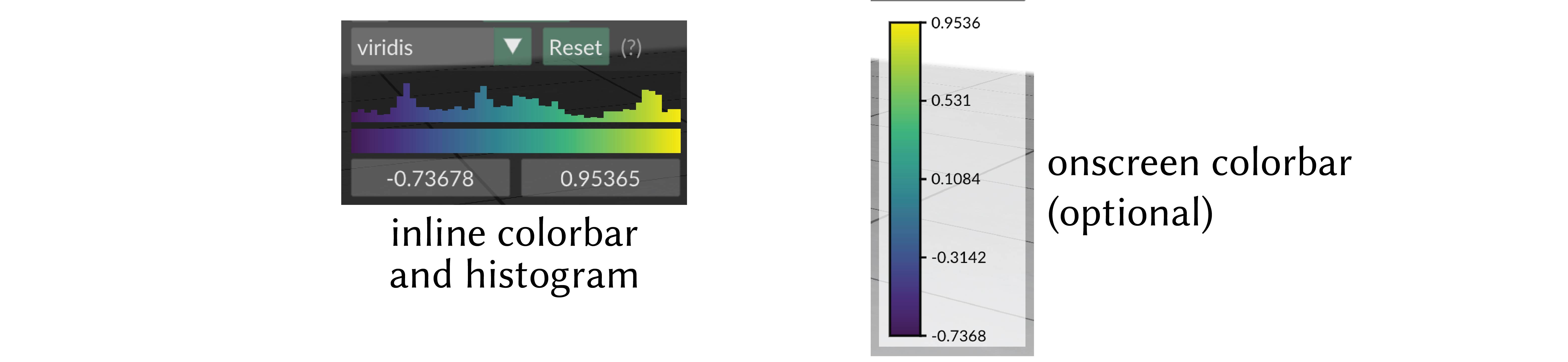
onscreen colorbar
Optionally an additional onscreen colorbar, which is more similar to the colorbars used in other plotting libraries, can be enabled with quantity->setOnscreenColorbarEnabled(true).
By default it is positioned automatically inline with the other UI elements, or it can be manually positioned with quantity->setOnscreenColorbarLocation(glm::vec2(xpos,ypos)).
You can even export this color map to an .svg file for creating figures, via the options menu, or with quantity->exportColorbarToSVG("filename.svg").
Scalar Quantity Options
These options and behaviors are available for all types of scalar quantities on any structure.
| Parameter | Meaning | Getter | Setter | Persistent? |
|---|---|---|---|---|
| enabled | is the quantity enabled? | bool isEnabled() |
setEnabled(bool newVal) |
yes |
| color map | the color map to use | std::string getColorMap() |
setColorMap(std::string newMap) |
yes |
| onscreen colorbar | additional onscreen colorbar | bool getOnscreenColorbarEnabled() |
setOnscreenColorbarEnabled(bool newVal) |
yes |
| onscreen colorbar location | where to put onscreen colorbar, (-1,-1) (default) means auto |
glm::vec2 getOnscreenColorbarLocation() |
setOnscreenColorbarLocation(glm::vec2 newVal) |
yes |
save colorbar to .svg file |
export colorbar to file | void exportColorbarToSVG(std::string filename) |
- | - |
| map range | the lower and upper limits used when mapping the data in to the color map | std::pair<double,double> getMapRange() |
setMapRange(std::pair<double,double>) and resetMapRange() |
no |
| isolines enabled | are isolines shaded (default=false) |
bool getIsolinesEnabled() |
setIsolinesEnabled(bool newVal) |
yes |
| isoline style | stripes or thin contour lines | IsolineStyle getIsolineStyle() |
setIsolineStyle(IsolineStyle newVal) |
yes |
| isoline period | period of isoline stripes, in data units | float getIsolinePeriod() |
setIsolinePeriod(float newVal) |
yes |
| isoline darkness | darkness of isoline stripes (default=0.7) |
float getIsolineDarkness() |
setIsolineDarkness(float newVal) |
yes |
| contour thickness | thickness of isoline contour lines (default=0.3) |
float getIsolineContourThickness() |
setIsolineContourThickness(float newVal) |
yes |
Color Quantities
Visualize RGB color data at the vertices or faces of the mesh. Colors are specified as 3-vectors of floats in the range [0,1].
Example:
polyscope::SimpleTriangleMesh* mesh =
    polyscope::registerSimpleTriangleMesh("my mesh", vertices, faces);

// Vertex colors
std::vector<glm::vec3> vColor(nVerts, {0.5f, 0.2f, 0.8f});
auto* qv = mesh->addVertexColorQuantity("my vertex color", vColor);
qv->setEnabled(true);

// Face colors
std::vector<glm::vec3> fColor(nFaces, {0.1f, 0.9f, 0.3f});
mesh->addFaceColorQuantity("my face color", fColor);
SimpleTriangleMeshVertexColorQuantity* SimpleTriangleMesh::addVertexColorQuantity(std::string name, const T& values)
Add an RGB color quantity defined at the vertices of the mesh.
valuesis the array of colors at vertices. The type should be adaptable to a 3-vector array offloats. The length must equal the current vertex count.
RGB values are interpreted in the range [0,1].
SimpleTriangleMeshFaceColorQuantity* SimpleTriangleMesh::addFaceColorQuantity(std::string name, const T& values)
Add an RGB color quantity defined at the faces of the mesh.
valuesis the array of colors at faces. The type should be adaptable to a 3-vector array offloats. The length must equal the current face count.
RGB values are interpreted in the range [0,1].
Updating Color Data
Color quantity values can be updated in-place without removing and re-adding the quantity. The new data must have the same count as the original.
void SimpleTriangleMeshVertexColorQuantity::updateData(const T& newValues)
Update the color values for a vertex color quantity. Length must match the current vertex count.
void SimpleTriangleMeshFaceColorQuantity::updateData(const T& newValues)
Update the color values for a face color quantity. Length must match the current face count.
Color Quantity Options
These options and behaviors are available for all types of color quantities on any structure.
| Parameter | Meaning | Getter | Setter | Persistent? |
|---|---|---|---|---|
| enabled | is the quantity enabled? | bool isEnabled() |
setEnabled(bool newVal) |
yes |